
Three steps from a file to a light show
No connected lights, no console — just a Windows PC. The application controls are in English; the guide uses their real names.
Open a scene
Drag an .mvr file from your console, CAD software or the MVR generator in GDTF Stage Studio into the window. Don't have one? The app opens with the bundled sample scene SampleMidStage.
Light the fixtures
Either send live DMX from a console or software over the network (Art-Net, sACN), or set dimmer, color and head movement with the mouse in the Local control panel — no console at all.
Adjust and save
Move or rotate fixtures in Patch → Placement, add another MVR (say, stands with lights) and save the result as a new MVR file for a console or another visualizer.
Step by step in detail: 3D Stage Visualizer user guide.
Rendering you can believe
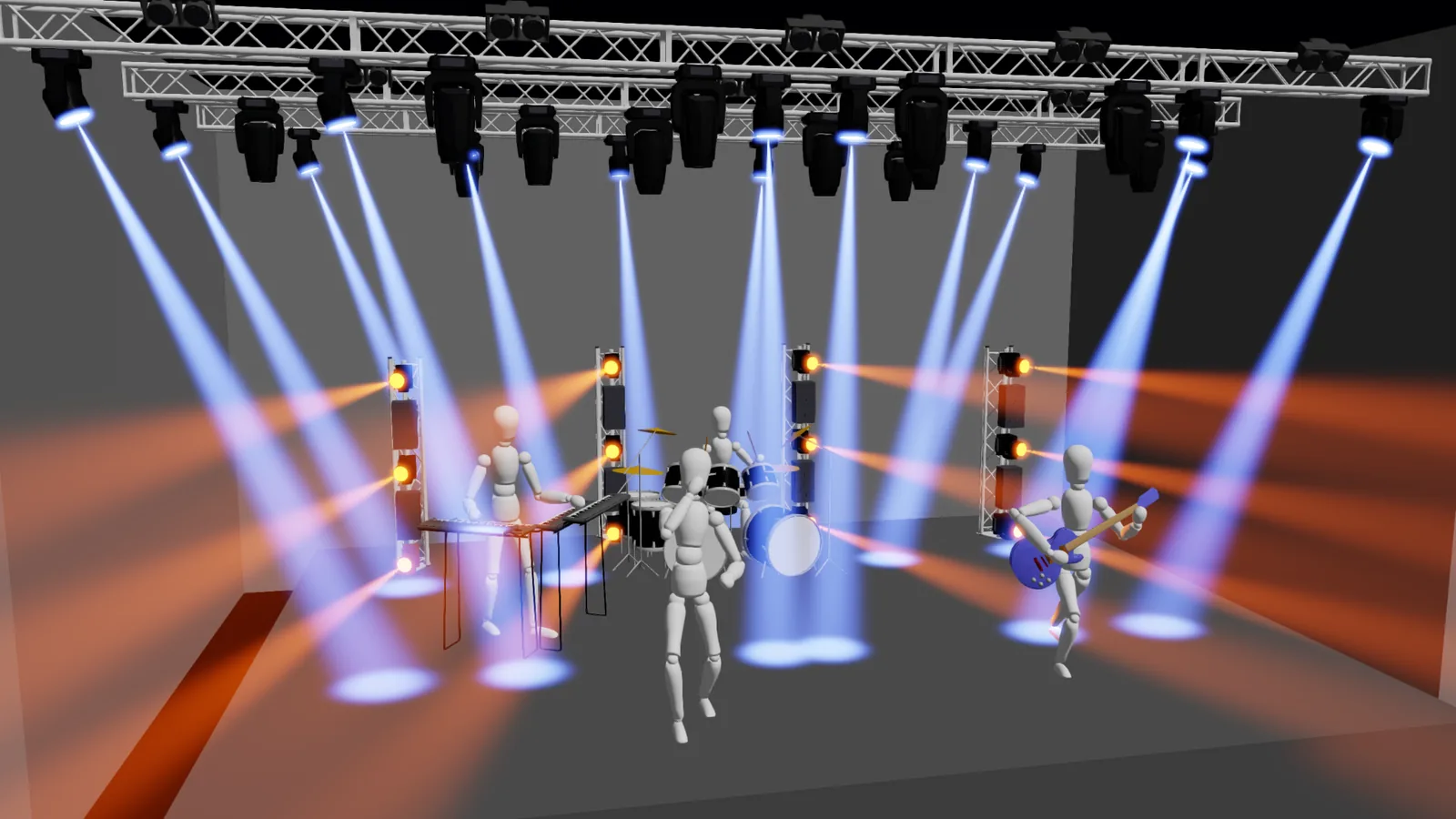
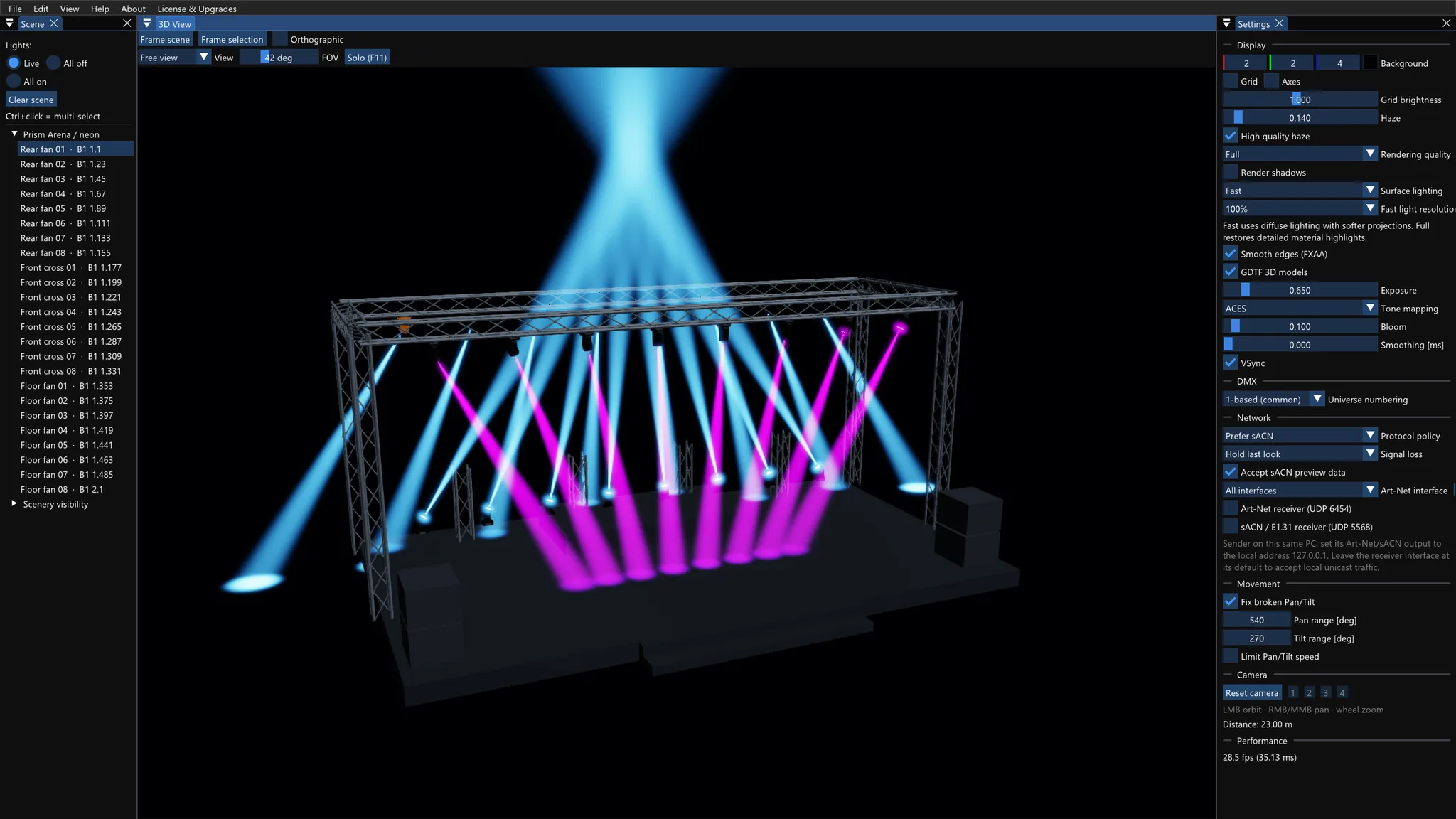
Every frame comes straight from the application — real scenes in the MVR format, fixtures with GDTF profiles. The look depends on the scene, the profiles and the render settings.


What it can do
Open an MVR scene
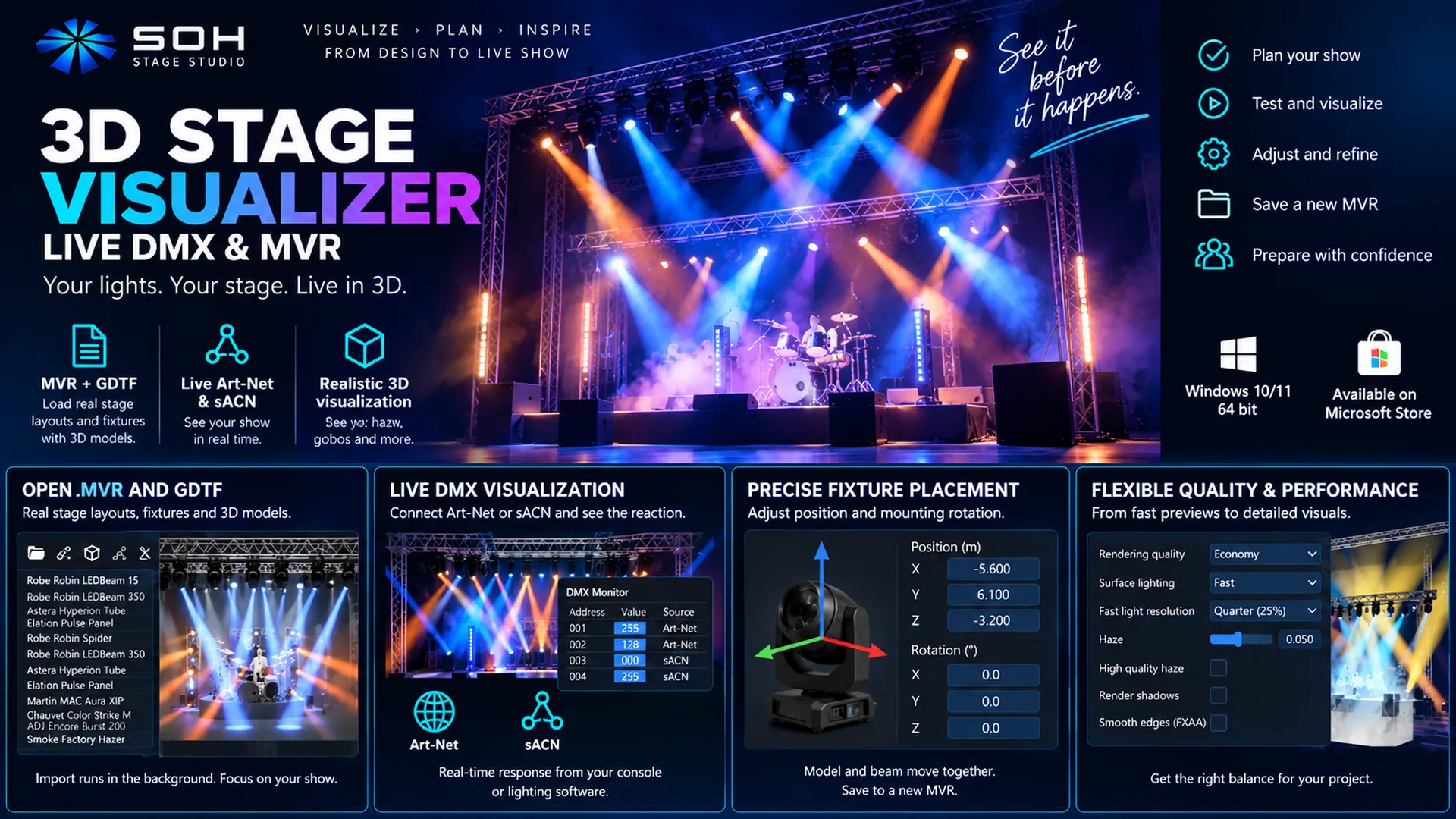
Most consoles and planning tools export MVR. Drag the file into the window — fixtures, DMX addresses, trusses, stages and set pieces load in. Add another MVR to the current scene (Add to scene).
GDTF fixtures with 3D models
Real fixture profiles: 3D bodies, DMX modes, gobo and color wheels. Drop a .gdtf into the window and the fixture is added, patched and framed by the camera straight away.
Live DMX over the network
Art-Net and sACN from any console or software — no extra cables, no hardware. DMX Monitor shows what is coming in: universes, addresses, values and source.
Local control without a console
In the Local control panel you light the selected fixture, set a color or move the head with the mouse. Perfect for trying a profile — nothing is sent to physical lights.
Move and rotate fixtures
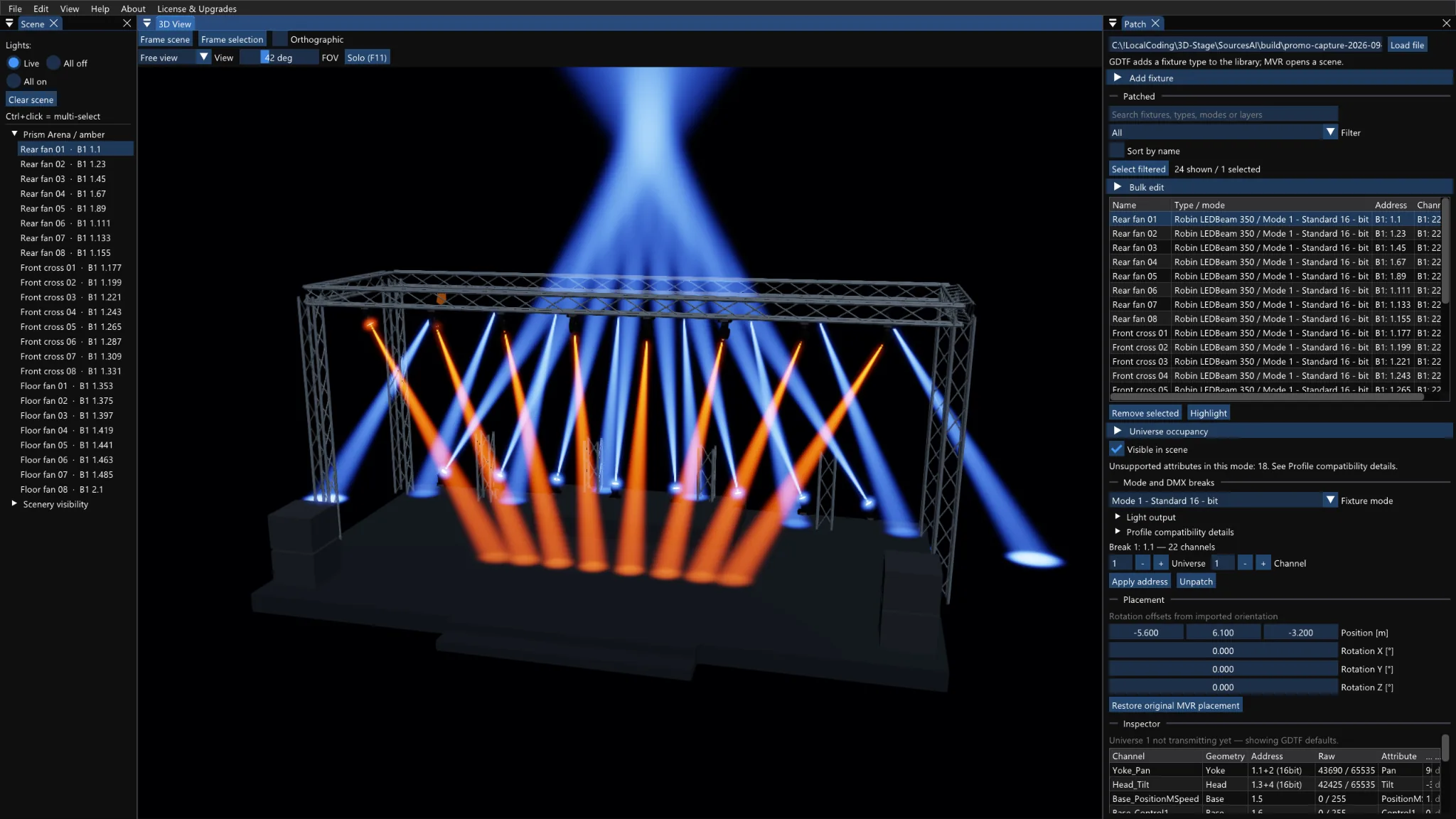
Patch → Placement: XYZ position in meters and mounting rotation in degrees, Undo/Redo and a return to the imported placement. Model and beam move together.
Combine several MVR files into one
Build a scene from several MVR files — add stands with lights or another rig to the main stage — and export it as one MVR (File → Export Combined MVR…). How it works
Beams, gobos and color
Volumetric beams in haze, gobo projection with rotation, zoom, iris, frost, strobe, CMY/RGBW mixing, color wheels, pixel fixtures and light hitting the floor and the scenery.
Laser effects
Patterns vectorized straight from GDTF (even from a photo of the pattern) — a circle becomes a hollow cone, a line a flat fan; selection, rotation, offset and size are DMX-controlled.
Runs on a laptop
Native Windows application. Rendering quality Full / Balanced / Economy and fast surface lighting — hundreds of fixtures in real time, even on integrated graphics.
Combine several MVR scenes into one file
Stage in one file, stands with lights in another? Open them side by side in 3D Stage Visualizer, fine-tune the fixture placement and save everything as one MVR — for a console, another visualizer or your archive.
- Add to scene — open side by side
- Patch → Placement — fine-tune placement
- check DMX address overlaps
- You pick the main MVR — it supplies the header and scene metadata; the other files contribute their layers, structures, fixtures, GDTF profiles and models.
- DMX addresses stay exactly as patched — any overlaps are reported, so the patch stays under your control.
- The output contains the imported scenes with the current fixture placement and addresses. The whole StageViz project — including separately added GDTF files and settings — is saved with Save Show.
Step by step: user guide — Combining several MVR files.
Free on the Microsoft Store
3D Stage Visualizer: Live DMX & MVR is a standalone application for Windows 10/11. The Free edition has unlimited viewing, editing and saving: open any MVR, adjust fixture placement, combine several scenes and save a new MVR or a portable .stageviz show. Only live network DMX input is limited — permanent licenses bought inside the app extend it.
Current version 1.4.6 · Windows 10/11, 64 bit · publisher SOH Sound & Lights s.r.o. The desktop edition with a full license ships with DMX Music Visualization AI.
| Free | live input for 1 universe, addresses 1–128 · unlimited viewing, editing and saving |
|---|---|
| 512 Channels | live input for 1 universe, addresses 1–512 |
| 6 Universes | up to 6 universes with 512 channels each |
| Max Universes | the maximum supported universes with 512 channels each (Art-Net/sACN protocol ranges and PC performance limits apply) |
The highest owned license applies; capacities do not add together, and you can buy a higher level directly without the lower ones. Manage and restore purchases in the app under License & Upgrades; the Microsoft Store shows the current price before purchase. Local control previews fixtures inside the app and does not send DMX to physical lights.
From picking fixtures to a music-driven show
3D Stage Visualizer also ships with DMX Music Visualization AI — software that uses AI to build a complete light show driven by your music. The visualizer shows it to you before you switch on a single real light.
Pick your lights
Build your rig in the GDTF Stage Studio library (9,500+ fixture profiles), choose one of 23 truss layouts and export MVR 3D — with embedded GDTF files, a complete DMX patch and truss structures.
Let AI create the show
Drag the file into DMX Music Visualization and confirm — AI generates scenes, chases and quick-function buttons, and your music drives the lights.
Watch it in 3D
DMX Music Visualization opens 3D Stage Visualizer by itself — it hands over the scene and streams live data. The visualizer also works standalone with any console over Art-Net/sACN.
Built on open formats
Questions we get most often
Do I need connected lights or a console?
No. You can view an MVR scene and light fixtures with Local control without any hardware. A live show appears as soon as a console or lighting software sends Art-Net or sACN into the network — even from the same computer.
What are MVR and GDTF?
MVR (My Virtual Rig) is a file with the whole scene: fixtures, their DMX addresses and positions, trusses, stages and set pieces — the "drawing" of a rig exported by a console, CAD software or GDTF Stage Studio. GDTF (General Device Type Format) describes one fixture type: DMX modes, 3D model, gobo and color wheels. Both are open standards.
How do I see a music-driven show?
DMX Music Visualization AI creates the music-driven show, opens StageViz by itself, hands over the scene and streams live data — the show appears in 3D straight away. Live DMX (Art-Net, sACN) from any console or lighting software is displayed the same way.
What can I edit?
It edits fixture placement and rotation, the patch including every DMX break (also in bulk), fixture modes and the visibility of fixtures and scene objects, and adds extra fixtures from GDTF files — all with Undo/Redo. It combines several MVR files into one and saves the result as a new MVR or a portable .stageviz show. Trusses, stages and set pieces come from the MVR — from GDTF Stage Studio, CAD or a console.
What does the Free edition include?
Unlimited viewing, editing and saving of scenes. Only live network DMX input is limited: 1 universe, addresses 1–128. A larger range (512 channels, 6 universes, maximum) is unlocked by permanent licenses bought in the app under License & Upgrades.
Runs on an ordinary laptop
| System | Windows 10 / 11, 64 bit |
|---|---|
| Graphics | Driver with OpenGL 4.3 core support (Intel HD from the Haswell generation, any newer NVIDIA/AMD). Without it a slower software rendering mode runs — the Store edition bundles it, the desktop edition offers it as a download. |
| Network | Art-Net (UDP 6454) and sACN (UDP 5568) input; also works with a console/software on the same computer. The local scene preview needs no connection. |
| Version | 1.4.6 (Microsoft Store), publisher SOH Sound & Lights s.r.o. |
| Distribution | Free from the Microsoft Store as 3D Stage Visualizer: Live DMX & MVR, or as part of DMX Music Visualization AI, which installs it alongside. |
| License | Store Free edition: unlimited viewing, editing and saving, live DMX input for 1 universe on addresses 1–128 (extend with an in-app purchase, see Download). The full unrestricted version is included with the DMX Music Visualization application. |
| Support | The guide on this site (User Guide), questions to eshop@soh.cz. |
Want to see your show before you build it?
Get 3D Stage Visualizer free from the Microsoft Store — or together with DMX Music Visualization AI, which includes it.