
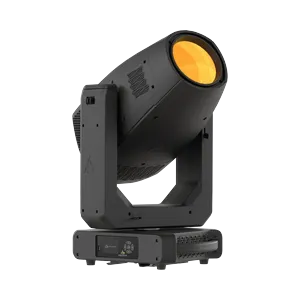
PROLIGHTS-149800
Prolights MuseProfile70CTPlus
1000W 6-Farben-LED-Quelle mit additiver Mischung, die >21.000 lm liefert. Hervorragende Farbwiedergabe: CRI bis zu Ra 99, R9 97, TLCI 97. SpektraOs-Ökosystem mit extrem weitem CCT-Bereich von 2.200K–15.000K, Farbtonkorrektur und fortgeschrittenen Steuerungsmodi (RGB / CMY / XY / RAW / Farbfolien- & Kunstlicht-Emulation). Vollständiges Effektpaket: physisches Farbrad, 2 rotierende Goboräder, 4-Messer-Framingsystem (vollständiger Schieber), Animationsrad, linearer Frostfilter, motorisierte Iris, absoluter Encoder.
Preis auf Anfrage
Downloads
| Parameter | Wert |
|---|---|
| CRI | 92 |
| Emitter | Red-RAW / Green-RAW / Blue-RAW / Cyan-RAW / Lime-RAW / Amber-RAW / Red / Green / Blue |
| Farbrad | 89 colors + open |
| Gewicht | 33 kg |
| DMX-Modi | Basic_CTC (43 ch) / Standard_RGB (49 ch) / Standard_CMY (49 ch) / Advanced_xy (49 ch) / RAW (54 ch) |
| Kurzname | MUSE70P |
| Langname | MuseProfile70CTPlus |
| Leistung | 1211 W |
| Revision | Rev 040 - Extensive Spectrum Data |
| Funktionen | Dimmer / Shutter-Strobe / Additive color mixing / CMY color mixing / Color wheel / Color temperature control / Gobo wheel / Rotating gobo / Prism / Frost / Iris / Zoom / Focus / Framing / Pan / Tilt |
| Lichtstrom | 21 075 lm |
| Pan / Tilt | 540° / 270° |
| Abmessungen | 308 × 102 × 411 mm |
| DMX-Kanäle | 43 / 49 / 54 |
| Fixture-UUID | 3F2E8495-DC65-4D1B-8047-DE5740D6C55C |
| GDTF-Version | 1.2 |
| Abstrahlwinkel | 5.9–49.7° (zoom) |
| Farbtemperatur | 6243 K |
| Betriebstemperatur | -10 to 45 °C |
| Abstrahlcharakteristik | Spot |
Daten aktualisiert
🔍
🎯 Alle9718💡 Moving Wash1376🎬 Moving Spot1366🎭 Moving Profile759🔦 Moving Beam122🔆 PAR / Uplight1451🌅 Fluter / Cyc824⬜ Weiß / CCT639🟨 Panel / Softlight190🟠 Fresnel / PC234🎞️ Profil / Ellipsoid240🟦 Pixel Bar1203⚡ Strobe / Blinder420✨ Effekt53🔺 Laser83🌫️ Atmosphärisch229🏗️ Rigging / Steuerung362⭐ SOH Lights167

CHAUVET-148015
WashMoving HeadChauvet ProfessionalLEDRGBWZoomStrobeIP65OutdoorRedGreenBlue
—

CLAY-98187
ProfileMoving HeadClay PakyLEDCMYZoomIrisPrismFrostGoboRotating goboAnimation wheelFramingStrobe
—


CHAUVET-91066
SpotMoving HeadChauvet ProfessionalLEDCMYZoomPrismFrostGoboRotating goboAnimation wheelStrobeIP65Outdoor
—

ROBE-116612
ProfileMoving HeadRobe LightingLEDCMYZoomIrisPrismFrostGoboRotating goboAnimation wheelFramingStrobe
—

ASTERA-75468
Pixel BarAstera LED TechnologyLEDRGBStrobeBatteryWireless DMXRedGreenBlueWhite Point
—


MARTIN-141216
ProfileMoving HeadMartin ProfessionalLEDCMYZoomIrisPrismFrostGoboRotating goboFramingStrobe
—

CHAUVET-146713
Pixel BarChauvet ProfessionalLEDRGBWZoomStrobeRedGreenBlue
—


CHAUVET-83447
FloodChauvet ProfessionalLEDRGBALStrobeRedGreenBlueAmber
—

CLAY-116429
ProfileMoving HeadClay PakyDischargeCMYZoomIrisPrismFrostGoboRotating goboAnimation wheelFramingStrobeLamp
—

ROBE-116621
ProfileMoving HeadRobe LightingDischargeCMYZoomPrismFrostGoboRotating goboAnimation wheelFramingStrobeIP65Outdoor
—

ASTERA-62991
FloodAstera LED TechnologyLEDRGBStrobeRedGreenBlueWhite Point
—

MARTIN-36845
ProfileMoving HeadMartin ProfessionalLEDCMYZoomIrisFrostGoboRotating goboAnimation wheelFramingStrobe
—

CHAUVET-58458
ProfileMoving HeadChauvet ProfessionalLEDCMYZoomIrisPrismFrostGoboRotating goboFramingStrobeIP65Outdoor
—

ELATION-132113
Pixel BarElationLEDRGBWZoomStrobeIP65OutdoorRedGreenBlue
—


CLAY-97983
SpotMoving HeadClay PakyDischargeCMYZoomPrismFrostGoboRotating goboAnimation wheelStrobe
—

MARTIN-36844
ProfileMoving HeadMartin ProfessionalLEDCMYZoomIrisFrostGoboRotating goboAnimation wheelFramingStrobe
—


CHAUVET-58456
ProfileMoving HeadChauvet ProfessionalLEDCMYZoomIrisPrismFrostGoboRotating goboAnimation wheelFramingStrobeIP65Outdoor
—


CHAUVET-89292
WashMoving HeadChauvet ProfessionalLEDRGBWZoomStrobeIP65OutdoorRedGreenBlue
—
🎨 AI STAGE VISUALIZER
📦 Ausgewählte Technik
Fügen Sie Produkte aus dem Katalog hinzu...
🎭 Szenentyp
✏️ KI-Prompt (bearbeitbar)
Der Prompt wird automatisch aus den ausgewählten Produkten erstellt. Sie können ihn bearbeiten.
🤖 KI-Modell
📐 Ausgabequalität
Auflösung
Seitenverhältnis
🎭
Technik auswählen, Szene wählen
und auf "Generieren" klicken
und auf "Generieren" klicken
🔗 Generierte Dateien
Es gibt noch keine Links zu generierten Dateien.