
ROBE-139139
Robe Lighting SVOPATT
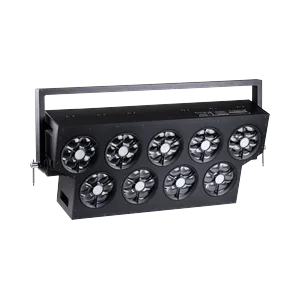
Ikonische Scheinwerfer sind in der Beleuchtungswelt sofort wiedererkennbar. Als stolzer Hersteller mit Sitz in Tschechien zollen wir der Vergangenheit Tribut und bringen Ihnen eine neue Ikone, den SVOPATT™. Im modernen Zeitalter angekommen, hinterlassen Sie mit dem SVOPATT™ sowohl als Szenenelement als auch als Quelle fesselnder Effekte garantiert Eindruck. Mit neun einzelnen Modulen, die jeweils 7 x 40W RGBW-Multichips enthalten, und dem mittleren Pixel, das zusätzlich ein weißes 200W-LED-Strobe enthält, erzeugt das Gerät über 75.000 lm (Ulbricht-Kugel). Damit besitzen Sie eine Lichtquelle, die ihrer Abstammung würdig ist.
Preis auf Anfrage
Downloads
| Parameter | Wert |
|---|---|
| CRI | 70 |
| Emitter | White |
| Farbrad | 66 colors + open |
| Gewicht | 37.3 kg |
| DMX-Modi | Mode 1 - Wash (25 ch) / Mode 2 - Individual LED modules (125 ch) / Mode 3 - LED modules and pixels (384 ch) / Mode 4 - Pixel mode (286 ch) / Mode 5 - One channel mode 2700K (1 ch) |
| Kurzname | SVOPATT |
| Langname | SVOPATT™ |
| Leistung | 4320 W |
| Revision | 2026-04-17 CTO channel revision |
| Funktionen | Dimmer / Shutter-Strobe / Additive color mixing / Color wheel / Color temperature control / Zoom / Tilt / Effects |
| Lichtstrom | 77 400 lm |
| Pan / Tilt | — / 360° |
| Abmessungen | 80 × 325 × 1151 mm |
| DMX-Kanäle | 1 / 25 / 125 / 286 / 384 |
| Fixture-UUID | 702E390C-1642-4343-86C0-216AA8762F7D |
| GDTF-Version | 1.2 |
| Abstrahlwinkel | 3.8–60° (zoom) |
| Farbtemperatur | 8000 K |
| Betriebstemperatur | 0 to 40 °C |
| Abstrahlcharakteristik | Wash |
Daten aktualisiert
🔍
🎯 Alle9718💡 Moving Wash1376🎬 Moving Spot1366🎭 Moving Profile759🔦 Moving Beam122🔆 PAR / Uplight1451🌅 Fluter / Cyc824⬜ Weiß / CCT639🟨 Panel / Softlight190🟠 Fresnel / PC234🎞️ Profil / Ellipsoid240🟦 Pixel Bar1203⚡ Strobe / Blinder420✨ Effekt53🔺 Laser83🌫️ Atmosphärisch229🏗️ Rigging / Steuerung362⭐ SOH Lights167

CHAUVET-148015
WashMoving HeadChauvet ProfessionalLEDRGBWZoomStrobeIP65OutdoorRedGreenBlue
—

CLAY-98187
ProfileMoving HeadClay PakyLEDCMYZoomIrisPrismFrostGoboRotating goboAnimation wheelFramingStrobe
—


CHAUVET-91066
SpotMoving HeadChauvet ProfessionalLEDCMYZoomPrismFrostGoboRotating goboAnimation wheelStrobeIP65Outdoor
—

ROBE-116612
ProfileMoving HeadRobe LightingLEDCMYZoomIrisPrismFrostGoboRotating goboAnimation wheelFramingStrobe
—

ASTERA-75468
Pixel BarAstera LED TechnologyLEDRGBStrobeBatteryWireless DMXRedGreenBlueWhite Point
—


MARTIN-141216
ProfileMoving HeadMartin ProfessionalLEDCMYZoomIrisPrismFrostGoboRotating goboFramingStrobe
—

CHAUVET-146713
Pixel BarChauvet ProfessionalLEDRGBWZoomStrobeRedGreenBlue
—


CHAUVET-83447
FloodChauvet ProfessionalLEDRGBALStrobeRedGreenBlueAmber
—

CLAY-116429
ProfileMoving HeadClay PakyDischargeCMYZoomIrisPrismFrostGoboRotating goboAnimation wheelFramingStrobeLamp
—

ROBE-116621
ProfileMoving HeadRobe LightingDischargeCMYZoomPrismFrostGoboRotating goboAnimation wheelFramingStrobeIP65Outdoor
—

ASTERA-62991
FloodAstera LED TechnologyLEDRGBStrobeRedGreenBlueWhite Point
—

MARTIN-36845
ProfileMoving HeadMartin ProfessionalLEDCMYZoomIrisFrostGoboRotating goboAnimation wheelFramingStrobe
—

CHAUVET-58458
ProfileMoving HeadChauvet ProfessionalLEDCMYZoomIrisPrismFrostGoboRotating goboFramingStrobeIP65Outdoor
—

ELATION-132113
Pixel BarElationLEDRGBWZoomStrobeIP65OutdoorRedGreenBlue
—


CLAY-97983
SpotMoving HeadClay PakyDischargeCMYZoomPrismFrostGoboRotating goboAnimation wheelStrobe
—

MARTIN-36844
ProfileMoving HeadMartin ProfessionalLEDCMYZoomIrisFrostGoboRotating goboAnimation wheelFramingStrobe
—


CHAUVET-58456
ProfileMoving HeadChauvet ProfessionalLEDCMYZoomIrisPrismFrostGoboRotating goboAnimation wheelFramingStrobeIP65Outdoor
—


CHAUVET-89292
WashMoving HeadChauvet ProfessionalLEDRGBWZoomStrobeIP65OutdoorRedGreenBlue
—
🎨 AI STAGE VISUALIZER
📦 Ausgewählte Technik
Fügen Sie Produkte aus dem Katalog hinzu...
🎭 Szenentyp
✏️ KI-Prompt (bearbeitbar)
Der Prompt wird automatisch aus den ausgewählten Produkten erstellt. Sie können ihn bearbeiten.
🤖 KI-Modell
📐 Ausgabequalität
Auflösung
Seitenverhältnis
🎭
Technik auswählen, Szene wählen
und auf "Generieren" klicken
und auf "Generieren" klicken
🔗 Generierte Dateien
Es gibt noch keine Links zu generierten Dateien.