
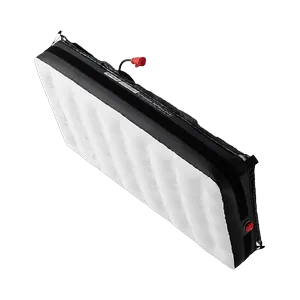
OGSON-111515
OGSON fixtures APUTURE INFINIMAT 2x4
LED flood light with RGBW colour mixing, a 104° beam and 24 DMX modes.
Price on request
Downloads
| Parameter | Value |
|---|---|
| CRI | 95 |
| Power | 1500 W |
| Weight | 41 kg |
| Emitters | Red / Green / Blue / White |
| Features | Dimmer / Shutter-Strobe / Additive color mixing / Color temperature control |
| Revision | ogi_v3 |
| Beam type | Wash |
| DMX modes | Mode 1: 1px CCT RGB 8bit (10 ch) / Mode 2: 1px CCT 8bit (6 ch) / Mode 3: 1px CCT HSI 8bit (9 ch) / Mode 4: 1px RGBWW 8bit (9 ch) / Mode 5: 1px Adv HSI 8bit (7 ch) / Mode 6: 1px x-y 8bit (6 ch) / Mode 7: 1px Gel 8bit (8 ch) / Mode 8: 1px Source 8bit (7 ch) / Mode 10: 4px LE CCT RGB 8bit (28 ch) / Mode 11: 4px LE RGB 8bit (16 ch) / Mode 12: 4px HSI 8bit (12 ch) / Mode 13: 4px x-y 8bit (12 ch) / Mode 15: 1px CCT RGB 16bit (17 ch) / Mode 16: 1px CCT 16bit (15 ch) / Mode 17: 1px CCT HSI 16bit (15 ch) / Mode 18: 1px RGBWW 16bit (15 ch) / Mode 19: 1px Adv HSI 16bit (11 ch) / Mode 20: 1px x-y 16bit (9 ch) / Mode 21: 1px Gel 16bit (9 ch) / Mode 22: 1px Source 16bit (8 ch) / Mode 24: 4px LE CCT RGB 16bit (56 ch) / Mode 25: 4px LE RGB 16bit (32 ch) / Mode 26: 4px HSI 16bit (24 ch) / Mode 27: 4px x-y 16bit (24 ch) |
| Long name | APUTURE INFINIMAT 2x4 |
| Beam angle | 104° |
| Dimensions | 700 × 400 × 400 mm |
| Short name | INFINIMAT 2x4 |
| DMX channels | 6 / 7 / 8 / 9 / 10 / 11 / 12 / 15 / 16 / 17 / 24 / 28 / 32 / 56 |
| Fixture UUID | 32571768-33C2-469F-9210-BDABE857A2C1 |
| GDTF version | 1.2 |
| Luminous flux | 120 000 lm |
| Color temperature | 3200 K |
| Operating temperature | -20 to 45 °C |
Data updated
🔍
🎯 All9718💡 Moving Wash1376🎬 Moving Spot1366🎭 Moving Profile759🔦 Moving Beam122🔆 PAR / Uplight1451🌅 Flood / Cyc824⬜ White / CCT639🟨 Panel / Softlight190🟠 Fresnel / PC234🎞️ Profile / Ellipsoidal240🟦 Pixel Bar1203⚡ Strobe / Blinder420✨ Effect53🔺 Laser83🌫️ Atmospheric229🏗️ Rigging / Control362⭐ SOH Lights167

CHAUVET-148015
WashMoving HeadChauvet ProfessionalLEDRGBWZoomStrobeIP65OutdoorRedGreenBlue
—

CLAY-98187
ProfileMoving HeadClay PakyLEDCMYZoomIrisPrismFrostGoboRotating goboAnimation wheelFramingStrobe
—


CHAUVET-91066
SpotMoving HeadChauvet ProfessionalLEDCMYZoomPrismFrostGoboRotating goboAnimation wheelStrobeIP65Outdoor
—

ROBE-116612
ProfileMoving HeadRobe LightingLEDCMYZoomIrisPrismFrostGoboRotating goboAnimation wheelFramingStrobe
—

ASTERA-75468
Pixel BarAstera LED TechnologyLEDRGBStrobeBatteryWireless DMXRedGreenBlueWhite Point
—


MARTIN-141216
ProfileMoving HeadMartin ProfessionalLEDCMYZoomIrisPrismFrostGoboRotating goboFramingStrobe
—

CHAUVET-146713
Pixel BarChauvet ProfessionalLEDRGBWZoomStrobeRedGreenBlue
—


CHAUVET-83447
FloodChauvet ProfessionalLEDRGBALStrobeRedGreenBlueAmber
—

CLAY-116429
ProfileMoving HeadClay PakyDischargeCMYZoomIrisPrismFrostGoboRotating goboAnimation wheelFramingStrobeLamp
—

ROBE-116621
ProfileMoving HeadRobe LightingDischargeCMYZoomPrismFrostGoboRotating goboAnimation wheelFramingStrobeIP65Outdoor
—

ASTERA-62991
FloodAstera LED TechnologyLEDRGBStrobeRedGreenBlueWhite Point
—

MARTIN-36845
ProfileMoving HeadMartin ProfessionalLEDCMYZoomIrisFrostGoboRotating goboAnimation wheelFramingStrobe
—

CHAUVET-58458
ProfileMoving HeadChauvet ProfessionalLEDCMYZoomIrisPrismFrostGoboRotating goboFramingStrobeIP65Outdoor
—

ELATION-132113
Pixel BarElationLEDRGBWZoomStrobeIP65OutdoorRedGreenBlue
—


CLAY-97983
SpotMoving HeadClay PakyDischargeCMYZoomPrismFrostGoboRotating goboAnimation wheelStrobe
—

MARTIN-36844
ProfileMoving HeadMartin ProfessionalLEDCMYZoomIrisFrostGoboRotating goboAnimation wheelFramingStrobe
—


CHAUVET-58456
ProfileMoving HeadChauvet ProfessionalLEDCMYZoomIrisPrismFrostGoboRotating goboAnimation wheelFramingStrobeIP65Outdoor
—


CHAUVET-89292
WashMoving HeadChauvet ProfessionalLEDRGBWZoomStrobeIP65OutdoorRedGreenBlue
—
🎨 AI STAGE VISUALIZER
📦 Selected equipment
Add products from the catalog...
🎭 Scene type
✏️ AI Prompt (editable)
The prompt is generated automatically from the selected products. You can edit it.
🤖 AI Model
📐 Output quality
Resolution
Output ratio
🎭
Select equipment, choose a scene
and click "Generate"
and click "Generate"
🔗 Generated files
There are no links to generated files yet.