
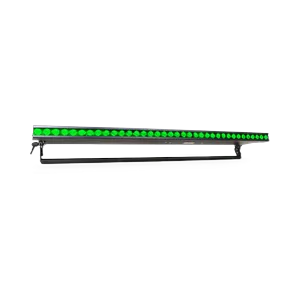
SOLARIS-81829
Solaris Flare Q plus Rayzr 100cm
Indoor LED fixtures are combination wash/strobe/blinders with class-leading LED RGBW brightness with greater than 9,500 lumens (Rayzr 50 cm) and greater than 19,500 lumens (Rayzr 100 cm). Features include instant color mixing and 1200Hz refresh rate for smooth on-camera dimming. Q+ technology increases the brightness with virtually no additional fan noise.
Price on request
Downloads
| Parameter | Value |
|---|---|
| CRI | 87 |
| Power | 360 W |
| Weight | 6.3 kg |
| Emitters | Red / Green / Blue / White / All In Full |
| Features | Dimmer / Shutter-Strobe / Additive color mixing / Tilt |
| Revision | v1.0.34 - MFR Release |
| Beam type | Wash |
| DMX modes | RGB 8bit (3ch) / RGB 16bit (6ch) / RGBW 8bit (4ch) / RGBW 16bit (8ch) / Strobe Only (4ch) / RGB Strobe (7ch) / RGBW Strobe (8ch) / RGB Pixel Mode 1 (10ch) / RGB Pixel Mode 2 (13ch) / RGB Pixel Mode 3 (16ch) / RGB Pixel Mode 4 (19ch) / RGB Pixel Mode 6 (25ch) / RGB Pixel Mode 12 (43ch) / RGBW Pixel Mode 1 (12ch) / RGBW Pixel Mode 2 (16ch) / RGBW Pixel Mode 3 (20ch) / RGBW Pixel Mode 4 (24ch) / RGBW Pixel Mode 6 (32ch) / RGBW Pixel Mode 12 (56ch) |
| Long name | Solaris Flare Q Plus Rayzr 100cm |
| Beam angle | 25° |
| Dimensions | 59 × 103 × 921 mm |
| Pan / Tilt | — / 180° |
| Short name | Flare Q+ RZ 100cm |
| DMX channels | 2 / 3 / 4 / 6 / 7 / 8 / 10 / 12 / 13 / 16 / 19 / 20 / 24 / 25 / 32 / 43 / 56 |
| Fixture UUID | 81BECBD6-E2A5-4A14-BE68-3D66D18D0447 |
| GDTF version | 1.2 |
| Luminous flux | 16 200 lm |
| Color temperature | 5700 K |
| Operating temperature | -25 to 40 °C |
Data updated
🔍
🎯 All9718💡 Moving Wash1376🎬 Moving Spot1366🎭 Moving Profile759🔦 Moving Beam122🔆 PAR / Uplight1451🌅 Flood / Cyc824⬜ White / CCT639🟨 Panel / Softlight190🟠 Fresnel / PC234🎞️ Profile / Ellipsoidal240🟦 Pixel Bar1203⚡ Strobe / Blinder420✨ Effect53🔺 Laser83🌫️ Atmospheric229🏗️ Rigging / Control362⭐ SOH Lights167

CHAUVET-148015
WashMoving HeadChauvet ProfessionalLEDRGBWZoomStrobeIP65OutdoorRedGreenBlue
—

CLAY-98187
ProfileMoving HeadClay PakyLEDCMYZoomIrisPrismFrostGoboRotating goboAnimation wheelFramingStrobe
—


CHAUVET-91066
SpotMoving HeadChauvet ProfessionalLEDCMYZoomPrismFrostGoboRotating goboAnimation wheelStrobeIP65Outdoor
—

ROBE-116612
ProfileMoving HeadRobe LightingLEDCMYZoomIrisPrismFrostGoboRotating goboAnimation wheelFramingStrobe
—

ASTERA-75468
Pixel BarAstera LED TechnologyLEDRGBStrobeBatteryWireless DMXRedGreenBlueWhite Point
—


MARTIN-141216
ProfileMoving HeadMartin ProfessionalLEDCMYZoomIrisPrismFrostGoboRotating goboFramingStrobe
—

CHAUVET-146713
Pixel BarChauvet ProfessionalLEDRGBWZoomStrobeRedGreenBlue
—


CHAUVET-83447
FloodChauvet ProfessionalLEDRGBALStrobeRedGreenBlueAmber
—

CLAY-116429
ProfileMoving HeadClay PakyDischargeCMYZoomIrisPrismFrostGoboRotating goboAnimation wheelFramingStrobeLamp
—

ROBE-116621
ProfileMoving HeadRobe LightingDischargeCMYZoomPrismFrostGoboRotating goboAnimation wheelFramingStrobeIP65Outdoor
—

ASTERA-62991
FloodAstera LED TechnologyLEDRGBStrobeRedGreenBlueWhite Point
—

MARTIN-36845
ProfileMoving HeadMartin ProfessionalLEDCMYZoomIrisFrostGoboRotating goboAnimation wheelFramingStrobe
—

CHAUVET-58458
ProfileMoving HeadChauvet ProfessionalLEDCMYZoomIrisPrismFrostGoboRotating goboFramingStrobeIP65Outdoor
—

ELATION-132113
Pixel BarElationLEDRGBWZoomStrobeIP65OutdoorRedGreenBlue
—


CLAY-97983
SpotMoving HeadClay PakyDischargeCMYZoomPrismFrostGoboRotating goboAnimation wheelStrobe
—

MARTIN-36844
ProfileMoving HeadMartin ProfessionalLEDCMYZoomIrisFrostGoboRotating goboAnimation wheelFramingStrobe
—


CHAUVET-58456
ProfileMoving HeadChauvet ProfessionalLEDCMYZoomIrisPrismFrostGoboRotating goboAnimation wheelFramingStrobeIP65Outdoor
—


CHAUVET-89292
WashMoving HeadChauvet ProfessionalLEDRGBWZoomStrobeIP65OutdoorRedGreenBlue
—
🎨 AI STAGE VISUALIZER
📦 Selected equipment
Add products from the catalog...
🎭 Scene type
✏️ AI Prompt (editable)
The prompt is generated automatically from the selected products. You can edit it.
🤖 AI Model
📐 Output quality
Resolution
Output ratio
🎭
Select equipment, choose a scene
and click "Generate"
and click "Generate"
🔗 Generated files
There are no links to generated files yet.